-1791966549842.webp)





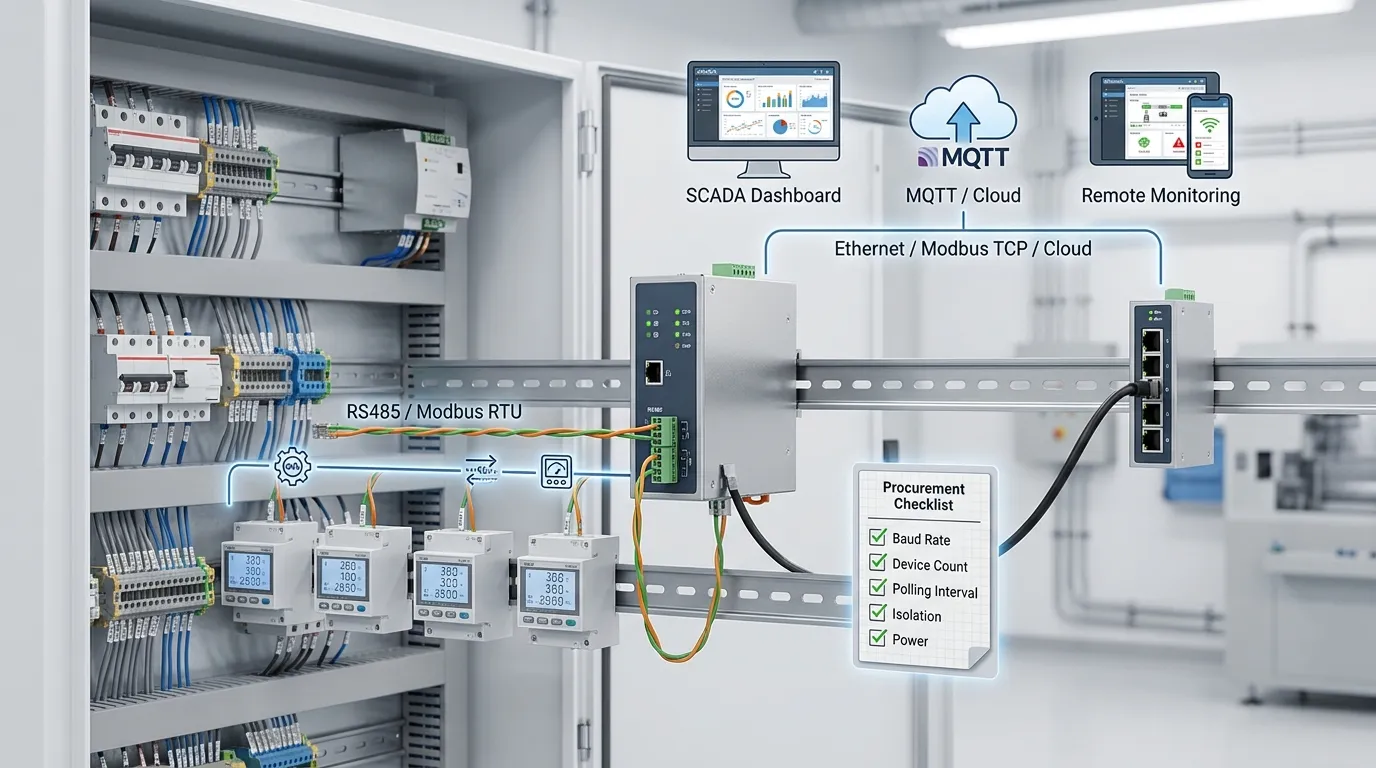

Tespro helps utility, metering, factory automation, SCADA, and industrial IoT buyers evaluate industrial Modbus gateway requirements before choosing hardware for RS485 device integration. A Modbus gateway should be selected by matching the field-side device interface with the upper system: Modbus RTU, Modbus TCP, SCADA, PLC, MQTT, cloud platform, or energy data workflow.
For most RS485 gateway projects, the key buying details are not only the gateway name. Buyers should confirm RTU/TCP direction, master/slave or client/server role, baud rate, parity, stop bits, number of devices, polling interval, isolation needs, power supply, and whether the data must be bridged to Ethernet, MQTT, or cloud software.
This checklist helps engineers and procurement teams prepare a clear RFQ before requesting a quote, datasheet, sample, demo, or technical consultation from Tespro.
When Do You Need an Industrial Modbus Gateway?
An industrial Modbus gateway is needed when existing RS485 devices must communicate with Ethernet, SCADA, PLC, industrial software, or cloud platforms. Typical devices include power meters, smart meters, sensors, controllers, data loggers, and other field devices using Modbus RTU or Modbus ASCII.
Buyers usually need this gateway when the project has one of these goals:
- Connect RS485 Modbus RTU devices to a Modbus TCP network
- Let a SCADA or PLC system read serial Modbus devices over Ethernet
- Collect meter or sensor data for energy monitoring
- Bridge field data to MQTT or cloud software
- Integrate legacy serial equipment into an industrial IoT system
- Reduce manual data collection from distributed field devices
- Prepare a gateway layer for smart grid or factory automation projects
For broader PLC, sensor, and equipment integration planning, buyers can also review Tespro’s factory automation gateway integration checklist.
Modbus Gateway Industrial Buying Checklist
Before choosing a gateway, confirm the technical direction of the project. A mismatch in role, wiring, serial setting, or polling requirement can cause communication failure even when the device category seems correct.
| RFQ item | What to confirm | Why it matters |
|---|---|---|
| Field device protocol | Modbus RTU, Modbus ASCII, or Modbus TCP | Defines the gateway conversion requirement |
| Physical interface | RS485, RS232, RS422, or Ethernet | Ensures wiring and port compatibility |
| Communication role | Master/slave or client/server | Prevents selecting the wrong gateway mode |
| Serial settings | Baud rate, parity, stop bits, data bits | All devices on the bus must match |
| Device count | Number of RS485 devices and IDs | Affects polling speed and gateway capacity |
| Register map | Address, data type, function code | Needed for correct data reading |
| Polling interval | Read frequency and latency target | Impacts performance and network load |
| Upper system | SCADA, PLC, Modbus TCP, MQTT, cloud, API | Determines Ethernet or platform-side requirements |
| Power and mounting | DC input, cabinet, DIN rail, enclosure needs | Affects installation and site readiness |
| Isolation and protection | Signal isolation, noisy site, surge risk | Important for harsh industrial environments |
| Remote access | Diagnostics, configuration, updates | Helps maintenance teams manage field sites |
Which Direction Do You Need: RTU to TCP, TCP to RTU, or MQTT?
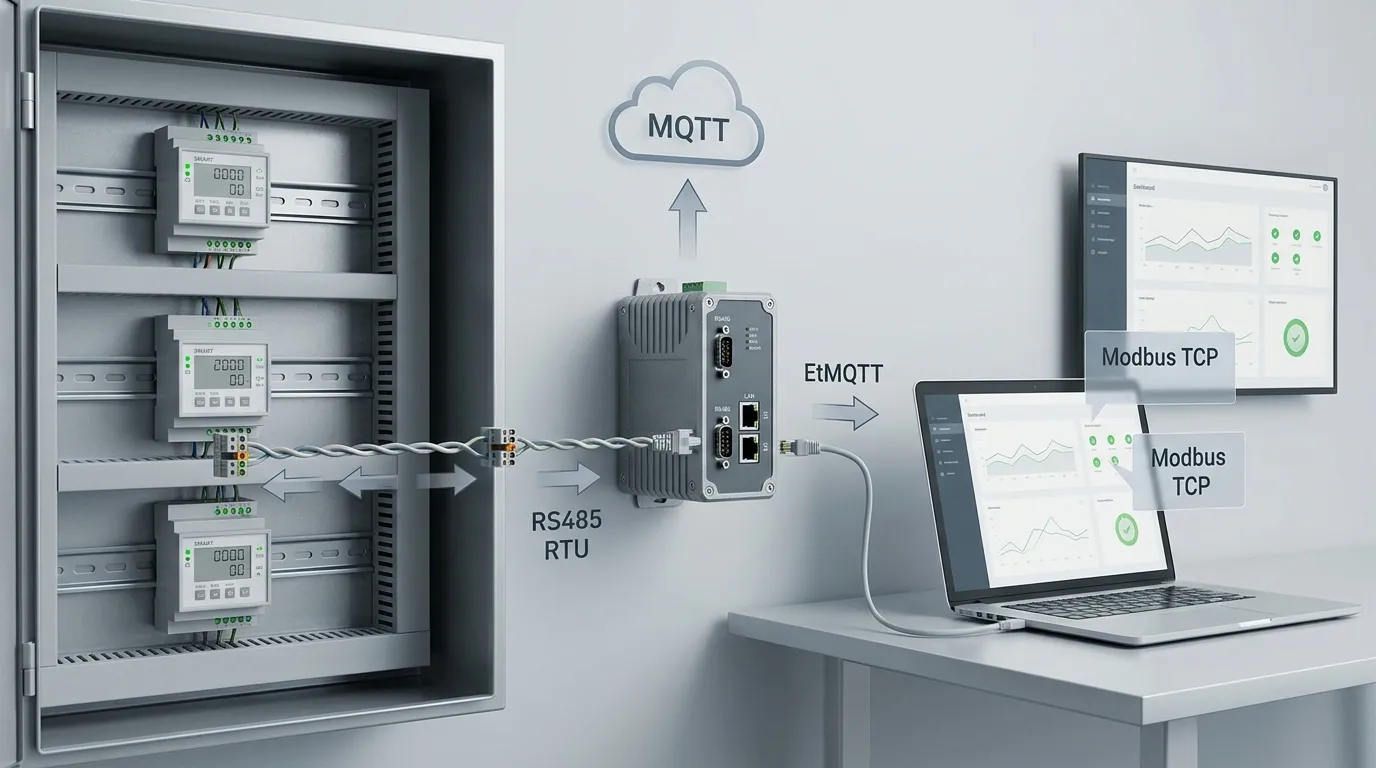
The most important decision is communication direction. Many Modbus projects fail because the buyer knows the protocol name but not the role each side must play.
A simple RS485-to-Ethernet project may need Modbus RTU-to-Modbus TCP conversion. In this case, serial field devices stay on RS485, while the SCADA, PLC, or software system reads them over Ethernet.
Some projects need the reverse direction. A Modbus TCP client may need to reach serial RTU devices through the gateway. Other projects need field data published to MQTT or cloud software instead of a traditional Modbus TCP system.
Confirm these points early:
- Which device starts communication?
- Is the gateway expected to poll RS485 devices?
- Is the upper system a Modbus TCP client?
- Does the platform need MQTT, HTTP, REST API, or JSON data?
- Does the gateway only pass data, or does it need mapping, caching, or local processing?
For real-time data handling, buffering, and edge-side decisions, Tespro’s edge gateway for real-time data selection checklist can support wider project planning.
RS485 Device Count, Polling Interval, and Performance
Device count is not only a quantity number. It affects bus load, response time, timeout settings, register reading, and gateway selection.
A small project may only have one or two RS485 devices. A larger cabinet, energy monitoring panel, or utility site may have many meters or controllers on the same bus. In that case, the buyer should calculate how often each device must be read and how much data is needed from each device.
Important inputs include:
- Number of RS485 devices
- Device ID list
- Register quantity per device
- Read-only or read/write operation
- Required polling interval
- Acceptable delay for dashboard or SCADA update
- Timeout and retry expectations
- Whether historical data buffering is needed
If a project needs fast updates from many devices, the gateway may need stronger polling, mapping, or caching features. If the system only reads periodic energy data, the requirement may be simpler.
Serial Port and Wiring Details to Confirm
RS485 projects are sensitive to wiring and serial configuration. A gateway cannot solve incorrect wiring, wrong baud rate, mismatched parity, or missing termination on a long bus.
Before requesting a quotation, prepare these details:
- RS485 2-wire or 4-wire requirement
- Baud rate
- Data bits
- Parity
- Stop bits
- Modbus slave ID range
- Cable distance
- Shielding and grounding method
- Termination resistor requirement
- Cabinet or field wiring constraints
- Need for RS232 or RS422 in addition to RS485
For energy meters and smart meter projects, also confirm whether the device has a standard Modbus register map. If the register map is custom, send it with the RFQ so the gateway and software workflow can be evaluated correctly.
Ethernet, Cloud, and Platform Integration
The upper-side system decides whether the buyer needs a basic Modbus TCP gateway, an industrial IoT gateway, or a gateway plus router and software workflow.
For SCADA and PLC projects, the gateway may only need stable Ethernet communication and Modbus TCP access. For remote monitoring or energy data projects, the buyer may need MQTT, API integration, dashboard compatibility, or cloud-side data formatting.
Confirm the platform-side requirements:
- Modbus TCP server or client role
- Static IP or DHCP requirement
- TCP port and firewall rules
- Local SCADA or remote server
- MQTT broker address and port if required
- Topic structure and payload format
- TLS or certificate requirement if specified by the platform
- API, HTTP, REST, or JSON requirement
- Alarm, dashboard, or export workflow
- Remote configuration and diagnostic needs
For smart grid and utility protocol planning, see Tespro’s smart grid gateway protocol integration checklist. For AIoT and cloud-side use cases, Tespro’s AIoT edge gateway checklist may also be useful.
When Do Isolation, Redundancy, and Rugged Design Matter?
Not every project needs the most advanced gateway. However, under-specifying hardware can create field failures, unstable readings, or maintenance problems.
Isolation and rugged design become important when the gateway is installed near high-power equipment, long RS485 cable runs, electrical panels, substations, outdoor cabinets, or noisy industrial sites. In these cases, buyers should ask whether signal isolation, power protection, wide power input, watchdog, and secure mounting are required.
Consider these deployment factors:
- Indoor cabinet or outdoor enclosure
- Factory floor, substation, utility site, or remote station
- Electrical noise and surge risk
- Available power supply
- DIN rail or panel mounting
- Space inside the control cabinet
- Heat, dust, vibration, or humidity exposure
- Need for redundant Ethernet or upstream router failover
- Maintenance access for technicians
A procurement team should not select a gateway only by port count. The physical environment often decides whether the selected device will remain stable after installation.
Configuration Checklist Before Commissioning
A clear configuration plan reduces installation delays. It also helps Tespro understand whether the project needs simple protocol conversion or a more complete gateway workflow.
Prepare this configuration checklist before field deployment:
- Assign IP address, subnet, gateway, and DNS if needed
- Set RS485 mode and serial parameters
- Enter device IDs and polling order
- Confirm Modbus function codes
- Add register addresses, data type, and scaling
- Define timeout and retry settings
- Set polling interval per device or register group
- Configure Modbus TCP client/server mode
- Configure MQTT broker, topic, and payload if required
- Test communication with one device before adding the full bus
- Check diagnostic logs or communication counters
- Document final settings for maintenance teams
For multi-site projects, ask whether the same configuration can be reused across sites or whether each site has different meter models, register maps, or network settings.
Common Buying Mistakes to Avoid
The biggest mistake is buying a gateway before confirming the communication role. A device may support Modbus, but still not match the project direction or platform workflow.
Avoid these issues:
- Selecting a gateway without confirming master/slave role
- Ignoring baud rate, parity, and stop bit settings
- Assuming all RS485 devices use the same register map
- Putting too many devices on one bus without checking polling time
- Forgetting isolation needs in noisy electrical environments
- Buying an MQTT gateway when the project only needs Modbus TCP
- Buying a basic converter when the platform needs data mapping or cloud payloads
- Exposing Modbus networks without proper network security planning
- Requesting a quote without device models or wiring details
A good RFQ should make the data path clear from field device to final software or control system.
What Should Buyers Send Tespro for a Quote?

For a faster technical review, send Tespro the project details before asking for price or datasheet selection. The more complete the RFQ, the easier it is to recommend the right gateway category or configuration.
Include:
- Required product type or gateway function
- Quantity
- Application type, such as metering, SCADA, energy monitoring, factory automation, or smart grid
- Meter, PLC, sensor, or controller model
- Protocol: Modbus RTU, ASCII, TCP, MQTT, HTTP, or API requirement
- Interface: RS485, RS232, RS422, Ethernet, or other ports
- Master/slave or client/server role
- Baud rate, parity, stop bits, and device IDs
- Register map and function codes
- Number of devices per gateway
- Polling interval or data update requirement
- Cloud, dashboard, MQTT broker, or software integration details
- Power supply and mounting condition
- Operating environment and enclosure constraints
- Security, remote access, or diagnostic needs
- Datasheet, sample, demo, consultation, or OEM/ODM request
- Delivery destination and any site drawing or system diagram
Why Work With Tespro for Modbus Gateway Projects?
Tespro works with industrial metering, connectivity, and energy data projects where field devices must connect reliably to software, platforms, and monitoring systems. Our product scope includes metering optical probes, DTUs, industrial routers, industrial gateways, meter test equipment, calibrators, and software/platform solutions.
For a Modbus gateway industrial project, Tespro can support buyers by reviewing the device interface, protocol path, network requirement, deployment condition, and RFQ details. This helps technical and purchasing teams avoid unclear specifications before requesting quotation or sample support.
Frequently Asked Questions
How do I choose between Modbus RTU-to-TCP and Modbus-to-MQTT?
Choose RTU-to-TCP when a SCADA, PLC, or local software system reads RS485 devices over Ethernet. Choose MQTT when data must be sent to a cloud platform, dashboard, or IoT software using broker-based messaging.
How many RS485 devices can connect to one gateway?
It depends on the gateway model, baud rate, register count, polling interval, cable quality, and device response time. Send the device count, ID list, and register map so the right configuration can be reviewed.
What serial settings are required before quotation?
Prepare the baud rate, parity, stop bits, data bits, RS485 wiring type, device IDs, and Modbus register map. These details are needed to confirm compatibility and avoid commissioning delays.
Do I need isolation for an RS485 Modbus gateway?
Isolation is useful in noisy industrial sites, long cable runs, power cabinets, substations, and locations with grounding risk. Buyers should confirm the electrical environment before choosing a standard or isolated gateway option.
Can a Modbus gateway connect energy meters to cloud software?
Yes, if the meter protocol, RS485 settings, register map, gateway function, and cloud-side protocol match the project. For cloud workflows, confirm whether the platform needs MQTT, API, JSON payloads, or a dashboard connection.
What should I send for a Tespro consultation?
Send the device model, quantity, protocol, interface, serial settings, register map, network target, platform requirement, power supply, installation environment, and any datasheet, sample, demo, or OEM/ODM needs.
Share your RS485 device list, Modbus role, serial settings, register map, polling requirement, Ethernet or cloud target, power supply, operating environment, and quantity with Tespro. Our team can review your project details and help you request a suitable quote, datasheet, sample, demo, consultation, or OEM/ODM support for your industrial Modbus gateway requirement.