-1791966549842.webp)





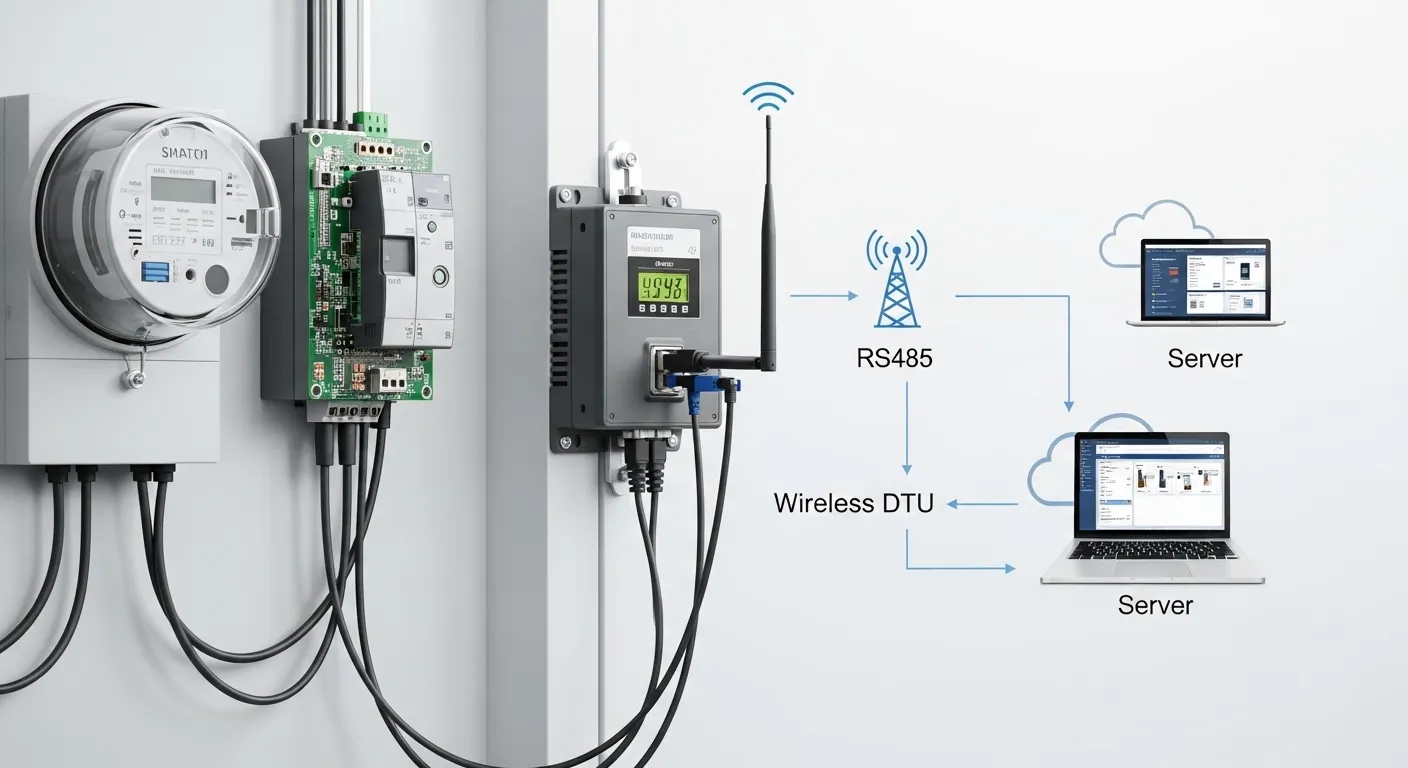

Tespro provides wireless DTU and industrial data transmission solutions for utilities, AMI/AMR project teams, industrial IoT integrators, SCADA teams, factory automation engineers, and procurement buyers who need reliable field data collection. A wireless data collection unit is useful when meters, PLCs, sensors, RTUs, inverters, or other field devices must send data to a server, HES, SCADA system, cloud platform, or monitoring dashboard without manual download or long wired communication runs.
A Wireless DTU is often the right choice when the field device already has a serial or industrial communication interface, such as RS232 or RS485, and the project needs remote data transfer through a cellular or wireless network. Buyers should confirm the interface, protocol mode, network type, SIM/APN requirements, power supply, enclosure, antenna, and remote maintenance needs before requesting a quote.
This guide helps buyers decide when transparent transmission is enough, when protocol conversion is required, and what project details to send Tespro for product selection, datasheet, sample, quotation, or technical consultation.
When Wireless DTU Beats Manual Download or Wired Collection
Manual data download works for small projects, but it becomes expensive when sites are far apart, data must be collected frequently, or field visits interrupt operations. A wireless DTU reduces the need for repeated site visits by sending device data remotely to the required software or server.
Wireless collection is also practical when wired communication is difficult. Long cable runs may be costly, exposed to damage, or unsuitable for outdoor cabinets, utility sites, pump stations, road equipment, factory zones, or mobile assets.
A wireless DTU is commonly considered when buyers need:
- Remote meter or sensor data collection
- AMR or field reading support
- Industrial device monitoring
- Serial device connection to a cloud or server
- SCADA or control room visibility
- Multi-site energy or equipment monitoring
- Data transfer from outdoor or hard-to-access locations
The main buying question is not only “Which DTU is available?” The better question is: “Which data flow, interface, protocol, network, and site condition must this DTU support?”
Transparent Transmission DTU or Protocol Conversion?
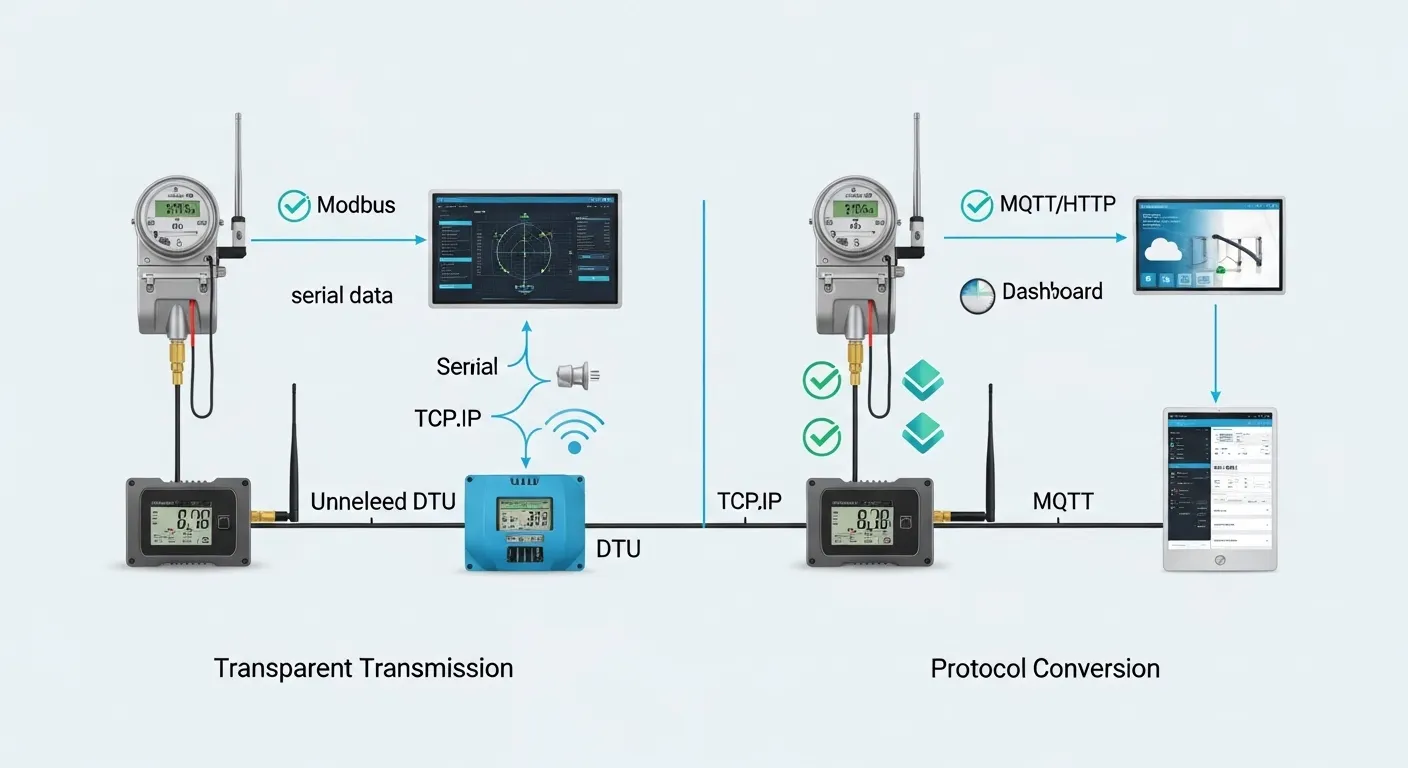
Transparent transmission is useful when the DTU should pass the original device data without changing the protocol content. In this setup, the field device sends serial data, and the DTU transfers that data to the remote server or software. The receiving system must already understand the original protocol.
A transparent transmission DTU is often suitable when an existing SCADA, meter reading system, HES, or custom server already knows how to poll and decode the field device. It helps buyers keep the current software workflow while replacing manual download or wired communication with wireless transmission.
Protocol conversion is different. It is needed when the field data must be changed into another format or protocol before reaching the destination system. For example, some projects may need Modbus RTU to Modbus TCP, MQTT reporting, HTTP posting, JSON formatting, or cloud platform integration.
Choose transparent transmission when:
- The existing software already supports the device protocol
- The buyer wants unchanged serial data forwarding
- The project uses remote polling from a server or control system
- The goal is to replace cable or manual download, not redesign the platform
Consider protocol conversion or a gateway-type solution when:
- The cloud platform needs MQTT, HTTP, API, or formatted data
- Different device protocols must be unified
- Local processing, data filtering, or edge logic is required
- The project needs integration beyond simple serial data forwarding
Key Specifications Buyers Should Confirm
Before choosing a wireless data collection unit, buyers should map the complete path from field device to software. A small mismatch can cause installation delays, failed communication, or extra configuration work.
Important technical details include:
- Device type: meter, PLC, RTU, sensor, inverter, logger, controller, or other equipment
- Interface: RS232, RS485, RS422, TTL, Ethernet, DI/DO, relay, or analog input
- Protocol: transparent serial, Modbus RTU, Modbus TCP, TCP/UDP, MQTT, HTTP, or other required protocol
- Serial settings: baud rate, parity, stop bits, data bits, device address, and polling method
- Network type: cellular, Wi-Fi, Ethernet backup, or another wireless option
- SIM and access: SIM card, APN, private APN, VPN, static IP, domain, server IP, and port
- Power: available voltage, power stability, backup power, and low-power operation needs
- Installation: cabinet space, DIN rail, wall mounting, antenna position, and cable routing
- Environment: indoor or outdoor use, heat, humidity, dust, vibration, surge risk, and maintenance access
- Management: local configuration, remote configuration, watchdog, heartbeat, firmware update, and device status monitoring
For AMI, AMR, smart metering, energy monitoring, and industrial IoT projects, the buyer should also confirm the data destination. The DTU may need to send data to a head-end system, SCADA platform, cloud dashboard, database, API endpoint, or customer-owned server.
Wireless DTU Buyer Decision Table
| Buyer requirement | What to confirm | Why it matters | RFQ note for Tespro |
|---|---|---|---|
| Transparent transmission | Original protocol, serial settings, server polling method | Keeps existing software workflow unchanged | Share device protocol and current software method |
| Protocol conversion | Modbus, MQTT, HTTP, TCP/UDP, data format | Needed for cloud, dashboard, or platform integration | Describe target platform and required data format |
| Multiple field devices | RS485 bus, device addresses, polling sequence | Affects wiring, response timing, and device count | Send device quantity per site and bus layout |
| Many project sites | Site count, SIM plan, remote management need | Large rollouts need easier configuration and maintenance | Share number of sites and deployment schedule |
| Weak signal locations | Carrier coverage, antenna location, cabinet material | Poor signal can cause unstable data collection | Provide site type and antenna restrictions |
| Remote maintenance | Configuration access, watchdog, heartbeat, firmware needs | Reduces field visits and troubleshooting cost | Explain who will manage devices after installation |
| Secure network access | APN, VPN, static IP, firewall rules | Affects server connection and remote access design | Share IT/security requirements early |
| Outdoor or harsh sites | Enclosure, power, temperature, humidity, surge risk | Field conditions affect device and accessory selection | Send installation photos or site notes if available |
Network and Server Details Affect DTU Selection
A wireless DTU project often fails when the hardware is selected before the network plan is clear. The buyer should confirm whether the DTU will connect outward to a server, listen for incoming connections, report to a cloud endpoint, or support two-way communication.
For cellular projects, SIM and APN details matter. Some projects use a standard SIM with outbound connection to a server. Others need private APN, VPN, static IP, or controlled network access for security and remote maintenance.
Buyers should also confirm:
- Server IP address or domain name
- TCP or UDP connection mode
- MQTT broker or HTTP endpoint if required
- Port number and firewall rules
- Data reporting interval
- Heartbeat or keep-alive requirement
- Backup server or failover expectation
- Whether remote commands are needed
For SCADA or industrial monitoring, the IT and automation teams should be involved early. This avoids a situation where the DTU is available, but the server, firewall, SIM, or access method blocks the project.
Site Count, Signal Strength, and Maintenance Access
A single test site is different from a multi-site rollout. For one or two devices, local configuration may be acceptable. For dozens or hundreds of field sites, buyers should plan remote management, consistent configuration files, device labeling, SIM tracking, and maintenance workflows.
Signal strength is another key factor. A DTU installed inside a metal cabinet may need antenna planning. Outdoor sites may need enclosure planning. Remote areas may need carrier comparison before final device selection.
Maintenance access also affects the buying decision. If a site is difficult to visit, the buyer should prioritize remote diagnostics, stable power, clear wiring, and documented configuration. If field teams will move the device between sites, installation speed and simple configuration become more important.
Common Selection Mistakes to Avoid
Many wireless DTU problems come from incomplete RFQ details, not from the device category itself. Buyers can reduce risk by avoiding these mistakes:
- Choosing a DTU before confirming the field device interface
- Assuming RS485 compatibility without checking protocol and serial settings
- Using transparent transmission when the platform needs converted data
- Ignoring SIM, APN, VPN, static IP, or firewall requirements
- Forgetting antenna placement in weak-signal cabinets
- Underestimating power supply and surge protection needs
- Planning many sites without remote configuration or device tracking
- Requesting a quote without sharing the target software or server workflow
A good procurement process connects engineering, IT, field deployment, and purchasing before final model selection.
RFQ Checklist for Wireless DTU Data Collection
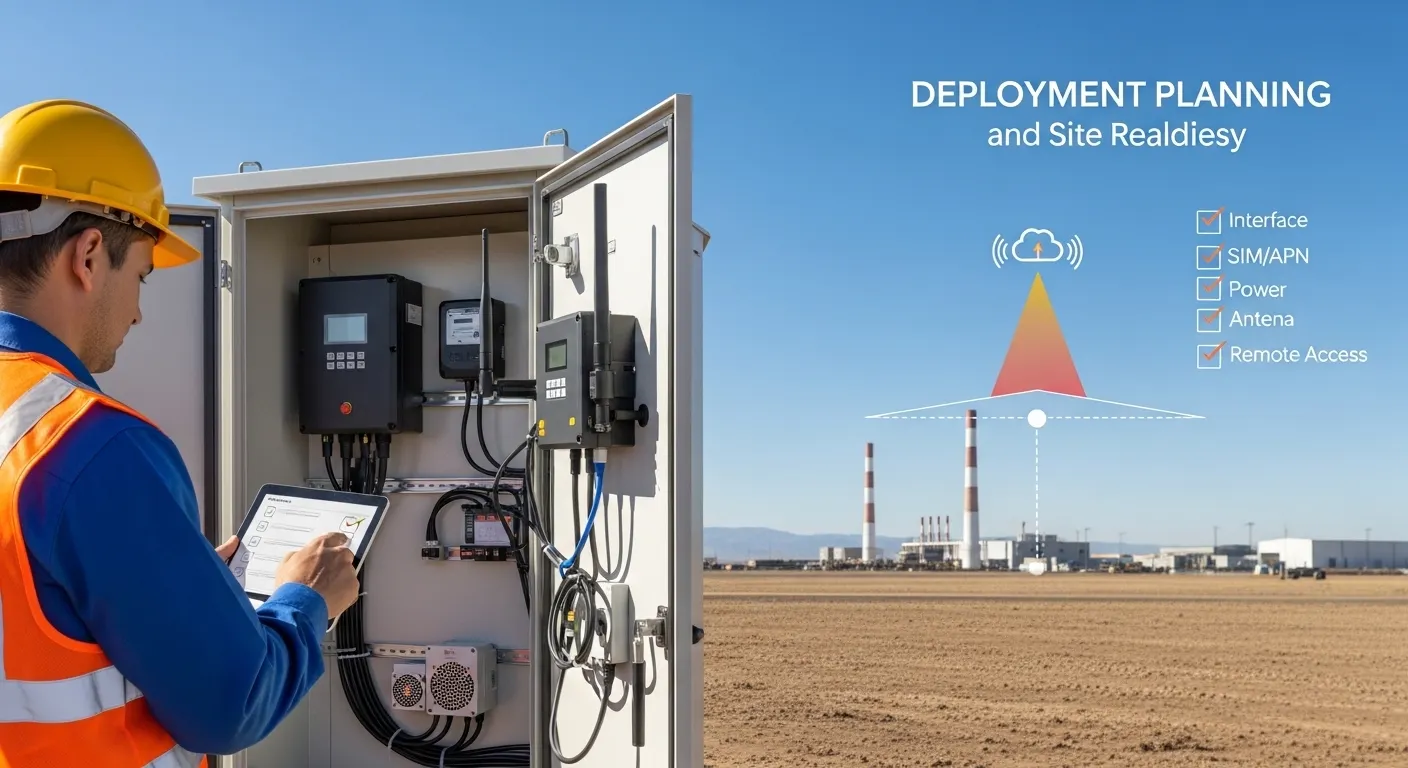
To help Tespro recommend a suitable wireless DTU, data transmission unit, router, gateway, or related configuration, prepare the following details before requesting a quote:
- Product or device type required
- Quantity and expected project scale
- Application type, such as AMR, remote monitoring, SCADA, energy management, factory automation, or smart city data collection
- Meter, PLC, sensor, RTU, inverter, or field device model
- Interface requirements, such as RS232, RS485, RS422, TTL, Ethernet, or I/O
- Protocol or communication standard
- Transparent transmission or protocol conversion requirement
- Network type, such as cellular, Wi-Fi, Ethernet, or mixed connection
- SIM, APN, VPN, static IP, domain, server IP, and port requirements
- Cloud, platform, API, SCADA, HES, or database integration needs
- Power supply and backup power condition
- Indoor, outdoor, cabinet, or harsh-site installation details
- Antenna, enclosure, DIN rail, wall mounting, or space constraints
- Security, remote management, watchdog, or firmware update needs
- Datasheet, sample, demo, or OEM/ODM support request
- Delivery destination
- Site drawing, wiring diagram, topology, or written specification if available
The more complete the RFQ information is, the easier it is to avoid wrong configuration, missed accessories, or delayed deployment.
Why Work With Tespro for Wireless Data Collection Projects
Tespro supports industrial metering, connectivity, and energy data projects across hardware and system planning needs. Buyers can discuss DTUs, industrial routers, gateways, metering optical probes, test equipment, calibrators, software platforms, and related smart metering or industrial IoT requirements with one technical supplier.
For wireless data collection projects, Tespro can review the device interface, communication method, network plan, deployment environment, and software destination before recommending the next step. This is useful for utilities, meter manufacturers, system integrators, distributors, OEM/ODM buyers, and project teams that need both technical discussion and commercial quotation support.
The goal is not only to supply a device. The goal is to help buyers choose a configuration that fits the data path, site condition, and long-term maintenance workflow.
Frequently Asked Questions
Is transparent transmission enough for wireless data collection?
Transparent transmission is enough when your existing software or server already understands the original device protocol. If the platform needs MQTT, HTTP, formatted data, or cross-protocol mapping, protocol conversion or a gateway-type solution may be better.
Can one wireless DTU collect data from multiple RS485 devices?
It may be possible if the RS485 bus, device addresses, protocol, baud rate, and polling sequence are correctly planned. Buyers should share the number of devices per site and the communication method before requesting a quote.
What is the difference between a DTU and an industrial gateway?
A DTU usually focuses on data transmission, often from serial devices to a remote server. An industrial gateway may add protocol conversion, edge processing, MQTT/API integration, buffering, or multi-protocol connection.
Do I need static IP or VPN for a wireless DTU?
It depends on the access model. Outbound DTU-to-server reporting may not need static IP. Remote access, private networks, or secure industrial systems may require APN, VPN, static IP, or specific firewall rules.
What network details should I prepare before buying?
Prepare the network type, carrier or SIM plan, APN, VPN or static IP requirement, server IP or domain, port number, protocol mode, and firewall rules. These details affect configuration and deployment success.
What should I send Tespro for a quote?
Send the device type, quantity, field device model, interface, protocol, network type, SIM/APN needs, server or platform details, power supply, site environment, antenna limits, enclosure needs, and datasheet or sample request.
To request a wireless DTU quotation, datasheet, sample, or technical consultation, share your project requirements with Tespro. Include the device type, quantity, application, meter or field device model, interface, protocol, network type, SIM/APN/VPN/static IP needs, platform or server destination, power supply, installation environment, enclosure limits, remote management needs, delivery destination, and any drawing or system diagram available.